
Every extra item in a customer's basket is a win. But when shoppers can't see how far they are from your free shipping threshold, they have no reason to add more. They check out with what they have, pay for delivery, and you lose the chance at a bigger order.
A shipping progress bar changes that. It gives customers a clear, visual target — spend a little more and shipping is free. It's one of the simplest changes you can make to a Shopify store, and it consistently pushes average order values up.
We built this feature as a custom solution for several of our clients' stores and saw the results first-hand. So we put together a free, stripped-back version that any Shopify store owner can add to their cart.
How it works
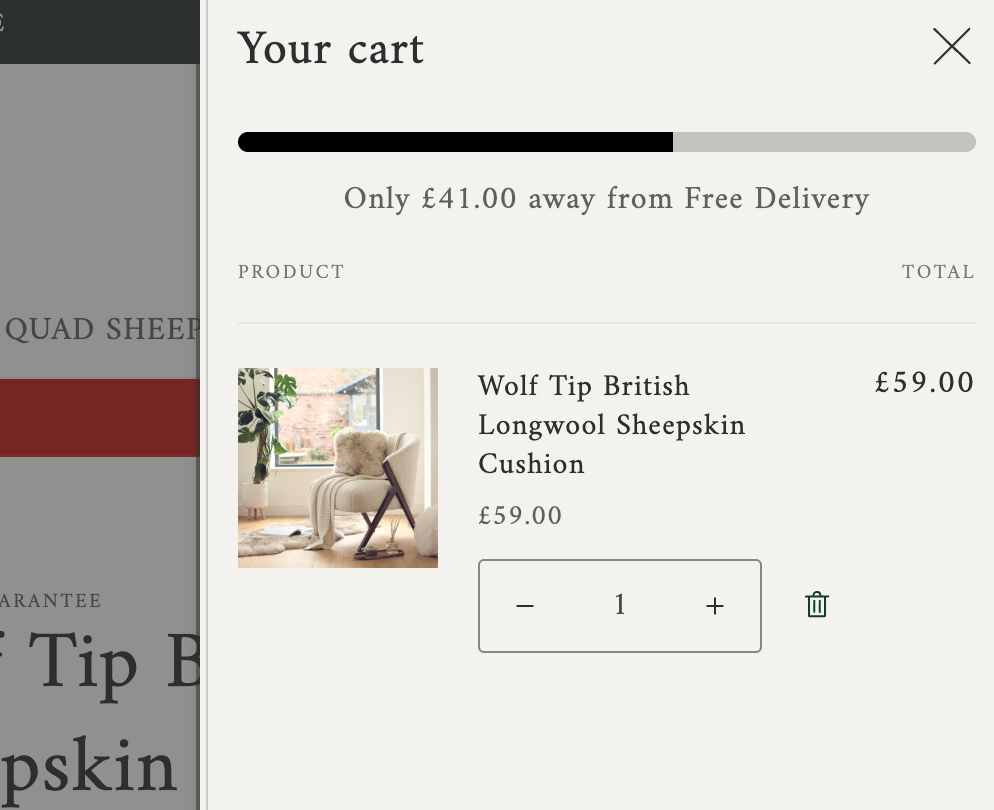
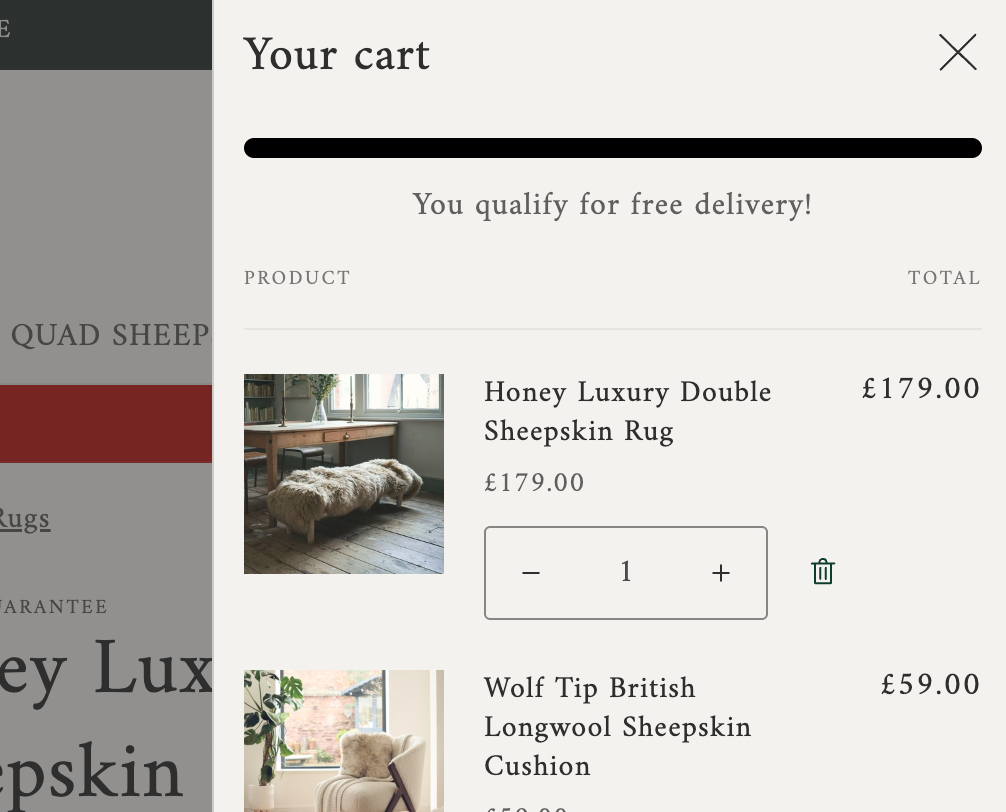
The progress bar appears inside your cart drawer (the slide-out panel customers see when they add something to their basket). As the cart total increases, the bar fills up. Once the customer hits your free shipping threshold, the bar completes and a confirmation message replaces the "amount remaining" text.
It's a lightweight, single Liquid snippet with built-in styles. No apps to install, no JavaScript dependencies, no monthly fees.
Partially filled progress bar in the cart drawer:
Progress bar reaches the free shipping threshold:
Adding it to your store
The code below is a Liquid snippet designed for Shopify's Dawn theme. It goes inside your cart drawer template and uses your cart's total price to calculate progress toward whatever free shipping threshold you set.
Here's what you need to know before getting started:
You'll be editing your live theme's code. Before making any changes, duplicate your current theme as a backup. You can do this from your Shopify admin under Online Store > Themes > Actions > Duplicate.
If your store runs Dawn (or a theme based on Dawn), the snippet goes into snippets/cart-drawer.liquid. Look for the line containing id="CartDrawer-CartItems" and paste the code on a new line inside that div.
If your theme isn't based on Dawn, the approach is the same but the file will be different. You'll need to find the Liquid file that controls your cart drawer or cart page — it's usually in the snippets or sections folder with "cart" in the filename. The code itself doesn't need to change, just where you place it.
The default threshold is set to 75 (in your store's base currency). Change the number on the assign threshold line to match your own free shipping minimum.
{% comment %}
  Free Shipping Progress Bar by Flair (https://flair.cl)
  Set your free shipping threshold below (in your store's base currency)
{% endcomment %}

{% assign threshold = 75 %}

{% assign cart_total = cart.total_price %}
{% assign threshold_cents = threshold | times: 100 %}

{% if cart_total >= threshold_cents %}
  {% assign progress_pct = 100 %}
  {% assign bar_message = 'You qualify for free shipping!' %}
{% else %}
  {% assign remaining_cents = threshold_cents | minus: cart_total %}
  {% assign remaining = remaining_cents | money %}
  {% assign progress_pct = cart_total | times: 100 | divided_by: threshold_cents %}
  {% capture bar_message %}Only {{ remaining }} away from free shipping!{% endcapture %}
{% endif %}

<div class="progress-bar-section">
  <div class="progress-bar">
    <div class="progress" style="width: {{ progress_pct }}%; display: block;"></div>
  </div>
  <p class="progress-bar-text">{{ bar_message }}</p>
</div>

{% style %}
  .progress-bar-section {
      font-size: 16px;
      margin-bottom: 16px;
      text-align: center;
  }

  .progress-bar-text {
      margin: 10px 0 0;
  }

  .progress-bar {
      margin: auto;
      background-color: rgba(0, 0, 0, 0.2);
      border-radius: 30px;
      overflow: hidden;
      height: 10px;
      max-width: 500px;
  }

  .progress {
      height: 100%;
      background-color: #000000;
  }
{% endstyle %}
That's enough to get a working progress bar into your cart. It's functional but basic, ready for you to customise. If you want something that feels like part of your store rather than something added on top of it, we can assist.
Going further with a custom build
The free snippet covers one location with one style. A custom version opens up a lot more:
Visibility across your whole store. Show the progress bar in your cart drawer, cart page, announcement bar, or all three. Wherever your customers check their basket, the incentive is there.
Styled to your brand. Custom colours, rounded or flat bars, icons, animated fills, typography that matches your theme. It should look like it was always part of your store.
Manageable from the theme editor. Set your threshold, toggle the bar on or off, and adjust the messaging — all from Shopify's customiser. No need to open a code file again after installation.
Smart targeting. Show different messages or thresholds based on customer tags, cart contents, or markets. Hide it entirely for customers who already qualify for free shipping through a loyalty programme or discount code.